1 · Open Brightspace
Sign in through your institution and open the extension from Chrome's toolbar.
Chrome extension · release candidate

A calmer, more consistent Brightspace experience
Access model
Brightspace can use a D2L-managed address or a school's own custom domain. Brightspace Dark+ detects the learning environment when you open its toolbar popup, then asks Chrome for access to that school site only. It does not request access to every website.
Sign in through your institution and open the extension from Chrome's toolbar.
Confirm the exact school domain shown in Chrome's permission prompt.
The packaged theme runs automatically on later visits to that enabled domain.
Remove the site's access from the popup or Chrome's extension settings at any time.
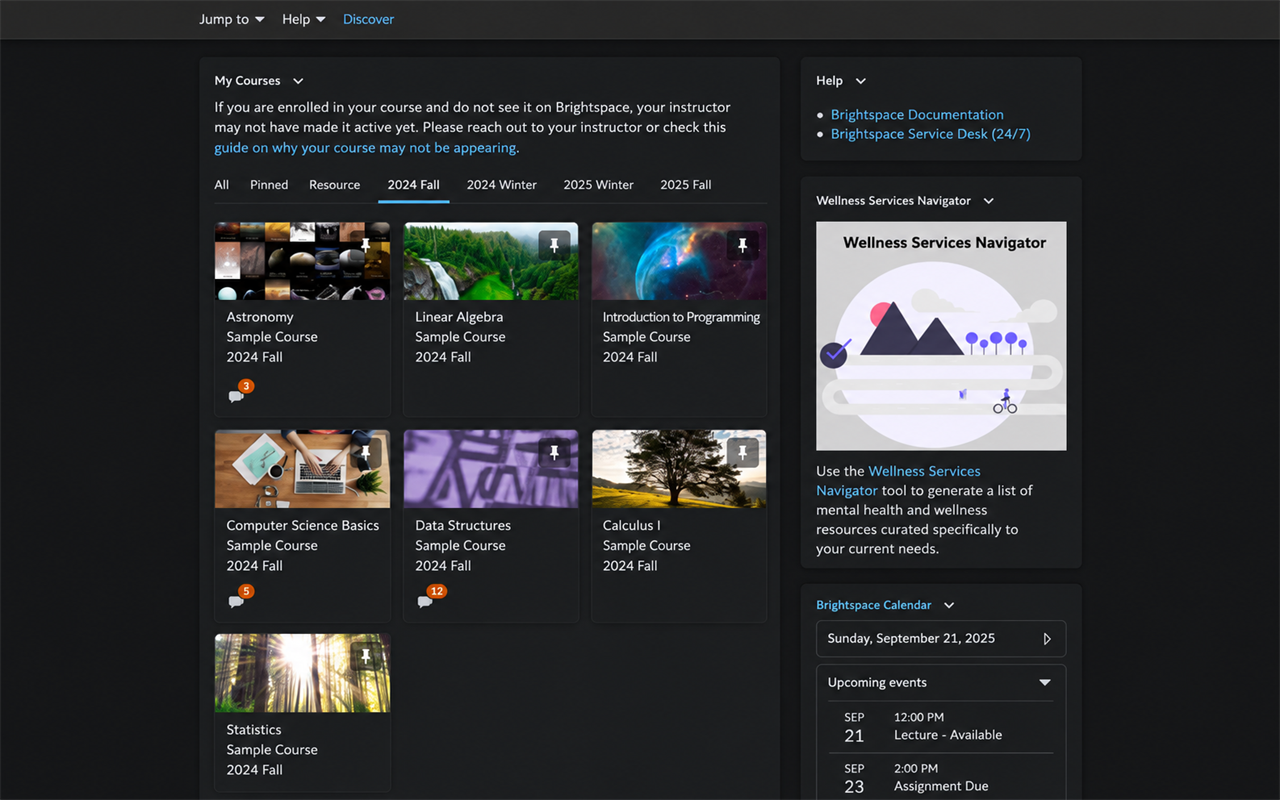
Preview
Coverage
Course cards, filters, loading states, menus, and dynamically replaced content.
Tables of contents, selected rows, embedded content, tabs, notices, and legacy controls.
Week, month, agenda, and list views with readable coloured event labels.
Assignments, discussions, grades, quizzes, editors, and fallback surfaces.
Each institution can customize Brightspace and add third-party tools. Cross-institution support is a compatibility target, not a promise that every school-specific page is already covered.
Privacy
The extension changes page presentation inside Chrome. It has no analytics, advertising, external server, remote code, or developer-operated data store. Page content is not transmitted to the publisher or any third party.
The extension is being packaged and reviewed before a public store listing is linked here.